7-Day Free Trial · No Credit Card Required

Compress Videos Up to 90% Smaller.
100% Offline. Zero Cloud Uploads.
Batch Compress Up to 10 Videos at Once.

Compress videos directly on your PC.
No uploads. No watermark. No file size limits.
Just drag, drop and compress.

Desktop app only. Send the link to yourself to download later.

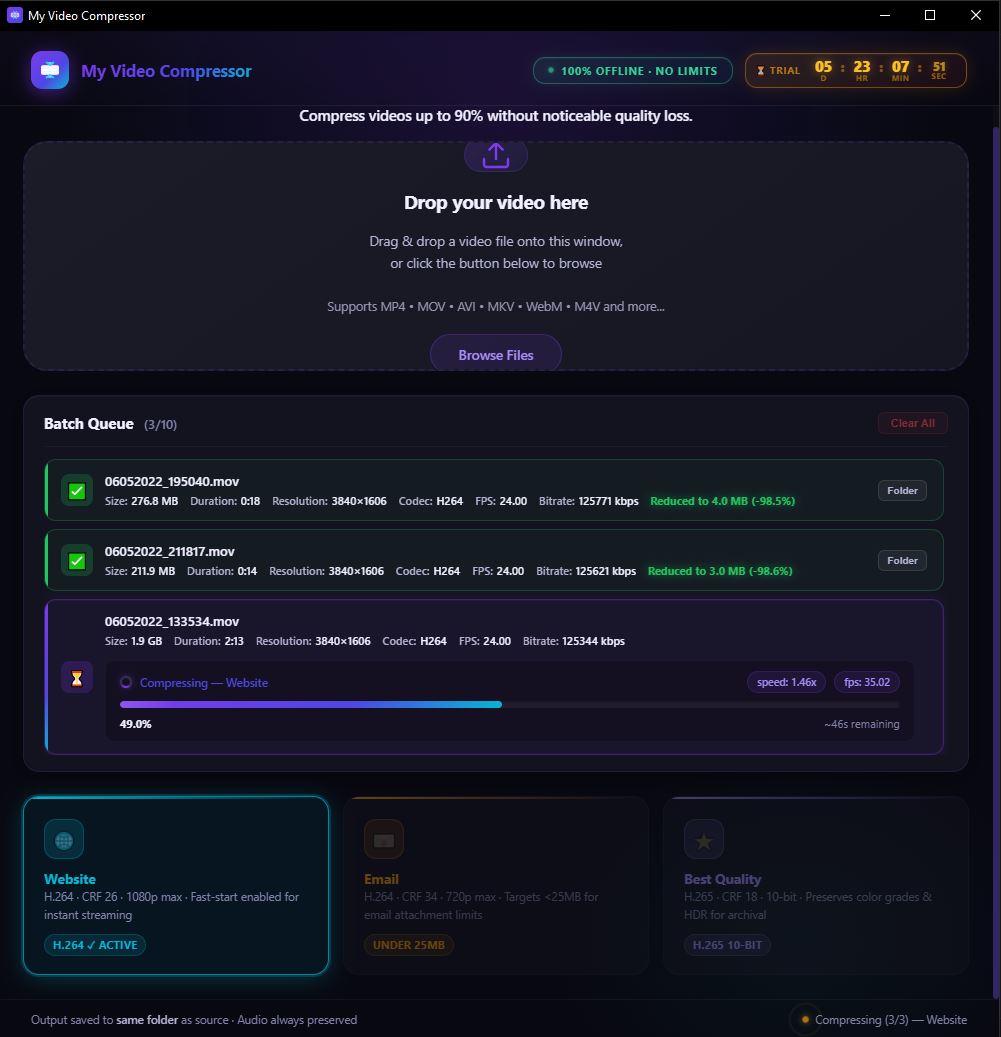
My Video Compressor App Interface
100% Offline Processing Simple Yearly Pricing FFmpeg-Powered H.264 · H.265/HEVC · MP4 · MKV 1-Year License 🌍 US$24.99/year
The Problem

Stop Wasting Time Waiting on the Cloud

Every other tool makes you upload your footage to their servers. That's slow, expensive, and a privacy risk with client footage.

The Old Way
  • Upload 50GB of raw wedding footage to someone's server and wait 3+ hours
  • Pay $20–$50/month for a SaaS subscription you'll forget to cancel
  • Client footage stored on foreign servers — a GDPR and NDA nightmare
  • Hit a file size limit of 2GB on the free plan — pay to unlock bigger files
The My Video Compressor Way
  • Drag and drop files — processing starts instantly on your local machine
  • Pay yearly — 🌍 US$24.99/year — and get continuous updates. Hardware-bound
  • Client footage never uploaded anywhere — 100% private by design
  • No file size limits, ever. 4K, 8K, RAW — if your drive holds it, we compress it
Features

Built for Serious Creators

Everything a freelance editor or YouTuber needs. Nothing they don't.

Batch Processing Queue

Drop up to 10 videos at once and walk away. Each file processes sequentially to protect your system resources. Perfect for delivery day.

Up to 10 videos per batch

100% Local & Private

Your footage never leaves your machine. No cloud uploads, no telemetry, no analytics. Fully offline after download — safe for client NDAs.

Zero bytes uploaded

Simple Yearly Pricing

A yearly payment of 🌍 US$24.99 unlocks the app on your machine. Hardware-bound licensing keeps pricing low.

Yearly license · Hardware-bound

Smart Compression Presets

Website (H.264 fast-start), Email (<25MB target), and Best Quality (H.265 10-bit HDR). One click — right settings every time.

FFmpeg-Powered Speed

Under the hood runs industry-standard FFmpeg — the same engine used by YouTube, Netflix, and VLC. Mature, battle-tested, and brutally fast.

Live Progress Tracking

Real-time progress bars, speed (MB/s), FPS counter, and ETA displayed per file. No black-box waiting — always know exactly what's happening.

How It Works

Ready in 3 Steps

1

Drag & Drop

Drop up to 10 video files into the queue. MP4, MOV, MKV, AVI, WEBM, M4V — all supported.

2

Pick a Preset

Choose Website, Email, or Best Quality. Each preset is tuned by experts — no FFmpeg knowledge needed.

3

Done. Locally.

Compressed files are saved next to the originals. Open the folder directly from the app. Audio always preserved.

Pricing

Simple Pricing. No Hidden Fees.

Free Trial
$0

7 days. Full access. No credit card required.

  • All 3 compression modes
  • Compress up to 10 videos at once
  • 100% Offline processing
  • No watermark
  • Supports all major video formats
Download Free Trial
Yearly Subscription

Unlock Unlimited Compression

  • Unlimited compression
  • Free updates for 1 year
  • Licensed for 1 PC
  • Priority email support
Download Free Trial

Purchase available inside the app after trial.

FAQ

Frequently Asked Questions

1. Does My Video Compressor need an internet connection to work?
No. All video compression happens 100% locally on your machine. We never upload your videos to the cloud, ensuring your privacy and saving you from slow upload/download speeds.
2. What video formats are supported?
We support all major video formats including MP4, MOV, MKV, AVI, WebM, and more. The output file will always be a highly compatible MP4 file.
3. Does it work with 4K and 8K videos?
Yes, My Video Compressor is optimized to handle extremely high-resolution files, including 4K, 8K, and high-framerate footage perfectly.
4. Is there a file size limit for videos I want to compress?
No, there are no artificial file size or length limitations. You can compress massive 4K raw recordings that are hundreds of gigabytes in size without any issues. The only limitation is your computer's own available storage space and hardware capacity.
5. Can I compress multiple videos at once?
Yes! Our batch queue feature allows you to drag and drop up to 10 videos at once. The app will process them sequentially in the background while you focus on other tasks.
6. Will compressing my video reduce its visual quality?
We use advanced FFmpeg encoding algorithms that optimize the bitrate to significantly reduce file size while keeping the visual quality practically indistinguishable from the original.
7. Does it work on Mac or Linux?
Currently, My Video Compressor is only available for PC. A Mac version is currently in development and will be released soon.
8. How does the 7-day free trial work?
Your 7-day trial starts the moment you install the app. It gives you unrestricted access to all features so you can test it on your actual workflow. No credit card is required to start the trial.
9. Is there a watermark on the compressed videos?
Absolutely not! Even during the 7-day free trial, we do not add any watermarks to your videos. You get the exact output that paid users get.
10. What is your refund policy?
We have a strict no-refund policy. We provide a fully-unlocked 7-day free trial specifically so you can evaluate the software thoroughly before deciding to purchase. Please test it fully during the trial period.
11. Is it an annual subscription?
It is an annual subscription. Your license is valid for 1 year and allows you to use the app on a single machine.
12. How do I activate my license after purchasing?
Activation is completely automatic! Once you complete your purchase using the link inside the app, the app will instantly verify your payment online and automatically unlock the yearly subscription on your machine.
13. Can I transfer my license to another computer?
No, the license is hardware-bound, meaning it is permanently tied to the PC it was originally purchased on. If you want to use the app on a second PC, you will need to buy an additional license.
14. What happens if I reinstall the OS? Will I lose my license?
No, you will not lose your license. Your hardware-bound license is tied to your physical motherboard. Simply download the app again, and it will automatically re-verify your hardware and restore your active subscription.
7-Day Full Trial — No Credit Card Required

Start Compressing
in 60 Seconds

Download, install, drag a video in. That's it. Your 7-day free trial begins automatically.
v1.0.0 · Desktop x64 · ~15MB installer